
 osebo50d ago
I'd love to be able to add connectors here like vercel so people can deploy new projects to vercel from here
osebo50d agoI'd love to be able to add connectors here like vercel so people can deploy new projects to vercel from here
Plan: workspace connectors, starting with Vercel
Today a workspace knows about exactly one external system (GitHub, via the owner's OAuth token). I'll add a generic connectors table and ship Vercel as the first provider, wired in three places:
0005_connectors:
connectors(id, workspace_id, provider, token, config jsonb, created_by, created_at), unique per (workspace, provider). Vercel config = { teamId?, scope (team slug or username), accountName }.repos.deploy jsonb — the Vercel project a repo was linked to ({ provider, projectId, projectName, url }), so the page can show "deployed → vercel.com/…" without round-tripping Vercel on every render.POST/DELETE /api/workspaces/[id]/connectors — paste a Vercel access token (+ optional team); the server verifies it against GET /v2/user + /v2/teams, stores it, never returns it to the client.POST /api/workspaces/[id]/deploy { repoId } — members: create a Vercel project linked to the repo's GitHub repo (POST /v11/projects with gitRepository) if there isn't one yet, then trigger a production deployment from the default branch (POST /v13/deployments). Returns project + deployment URLs.launch.ts injects VERCEL_TOKEN (+ VERCEL_TEAM_ID/VERCEL_ORG_ID) into the sandbox and context.ts adds a <connectors> block to the system prompt (how to use npx vercel --token … --scope … or the REST API, which repos are already linked). So "deploy this to Vercel" becomes something people can ask Claude in a thread, not just click.Not in scope now: Vercel OAuth (needs a published Vercel Integration — token paste is the pragmatic first step), secret encryption at rest (tokens are stored like GitHub OAuth tokens today; I'll flag it as a follow-up), other providers (the table/UI are provider-generic so adding one is a new lib/connectors/<provider>.ts).
threadide@7a3f5a8Backend is in (commit 7a3f5a8 on thread/e88cfacf), UI is written and typechecks; next build and a screenshot are running now.
What exists so far:
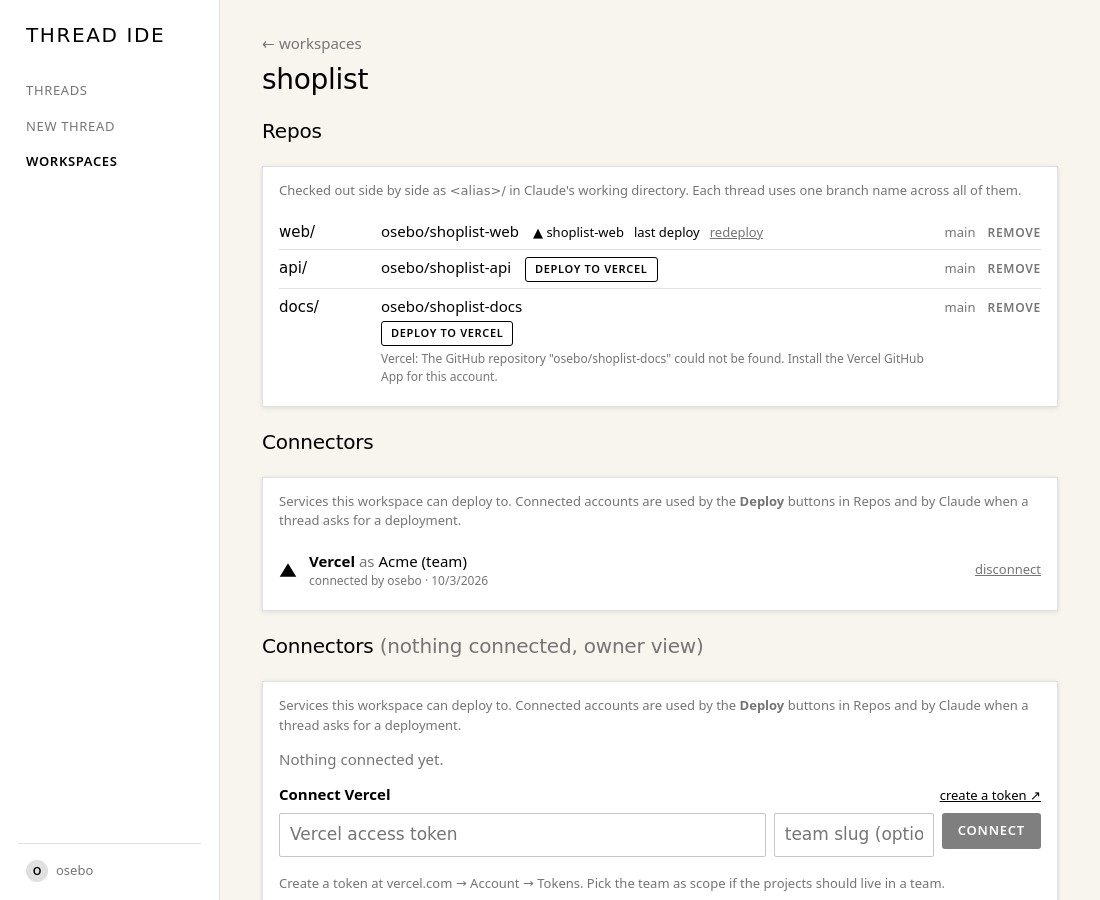
drizzle/0005_connectors.sql: connectors table + repos.deploy jsonb.lib/connectors/vercel.ts: token verify (/v2/user, /v2/teams), reuse-or-create project linked to the GitHub repo (/v9/projects?repoUrl=, POST /v11/projects), production deploy (POST /v13/deployments with gitSource). lib/connectors/index.ts is the provider registry (label, token URL, verify, sandbox env).POST/DELETE /api/workspaces/[id]/connectors (owner), POST /api/workspaces/[id]/deploy { repoId } (any member), POST /api/internal/jobs/[id]/deploy { alias } (runner).VERCEL_TOKEN, VERCEL_ORG_ID, VERCEL_TEAM_ID, VERCEL_SCOPE; the system prompt gains a <connectors> block (and repo lines say which project they're deployed as); the runner registers a deploy(repo_alias, ref?) MCP tool only when the workspace has a Vercel connector.components/connectors.tsx (Connectors card: connected-as row, two-tap disconnect, owner token form with team slug) and components/deploy-button.tsx (per-repo "Deploy to Vercel" → project link + last deploy + redeploy).One thing to be aware of when trying it: Vercel can only import a GitHub repo if the Vercel GitHub App is installed on that GitHub account/org. If it isn't, the first deploy fails with Vercel's message in the row — install the app from the Vercel dashboard once and retry.
threadide@249a20dDone — PR #47, branch thread/e88cfacf (249a20d). Workspaces can now be connected to Vercel and deploy their repos there, from the page or by asking Claude.
vercel.com/account/tokens is right there), optionally a team slug. The server verifies it against Vercel (/v2/user, /v2/teams) before saving and shows "Vercel as Acme (team) · connected by osebo".main keep deploying and thread-branch PRs get preview URLs) and triggers a production deployment. After that the row shows ▲ project-name (dashboard link), last deploy (inspector), and redeploy. Any member can deploy; only owners manage connectors.web to Vercel" now works: Claude's sandbox has VERCEL_TOKEN/VERCEL_ORG_ID/VERCEL_TEAM_ID/VERCEL_SCOPE, the system prompt has a <connectors> block, and the runner registers a deploy(repo_alias, ref?) tool (only when the workspace has a Vercel connector). The tool goes through the same server-side deployRepo() as the button, so the repo row updates either way.0005_connectors lands when the PR merges and prod redeploys (preview deploys don't migrate). Until then the connectors card would 500 on prod — standard for this repo.accounts, and only read server-side (listConnectors() strips them before anything reaches a page). Encryption at rest would be a reasonable follow-up for both.lib/connectors/<provider>.ts + an entry in PROVIDERS (lib/connectors/index.ts); table, routes and the Connectors card are provider-generic.tsc --noEmit and a full next build pass (new routes /api/workspaces/[id]/connectors, …/deploy, /api/internal/jobs/[id]/deploy compile). The UI screenshot is a static mockup against the real globals.css (app can't run in the sandbox); phone width also checked. Not exercised: a real Vercel API round-trip — I've used the documented v2/v9/v11/v13 endpoints, but the first live deploy is the real test; errors are surfaced verbatim in the row so it'll be obvious if Vercel wants something different.
 README.md                                   |  12 ++-
 app/api/internal/jobs/[id]/context/route.ts |   3 +
 app/api/internal/jobs/[id]/deploy/route.ts  |  29 +++++
 app/api/workspaces/[id]/connectors/route.ts |  53 ++++++++++
 app/api/workspaces/[id]/deploy/route.ts     |  28 +++++
 app/globals.css                             |  22 ++++
 app/workspaces/[id]/page.tsx                |  29 ++++-
 architecture.md                             |   1 +
 components/connectors.tsx                   | 157 ++++++++++++++++++++++++++++
 components/deploy-button.tsx                |  68 ++++++++++++
 db/schema.ts                                |  54 ++++++++++
 drizzle/0005_connectors.sql                 |  19 ++++
 drizzle/meta/_journal.json                  |   7 ++
 lib/agent/launch.ts                         |   7 +-
 lib/agent/runner.mjs                        |  35 ++++++-
 lib/connectors/deploy.ts                    |  18 ++++
 lib/connectors/index.ts                     |  40 +++++++
 lib/connectors/vercel.ts                    | 144 +++++++++++++++++++++++++
 lib/context.ts                              |  29 ++++-
 lib/data.ts                                 |  61 ++++++++++-
 20 files changed, 802 insertions(+), 14 deletions(-)

diff --git a/threadide/drizzle/0005_connectors.sql b/threadide/drizzle/0005_connectors.sql
new file mode 100644
--- /dev/null
+++ b/threadide/drizzle/0005_connectors.sql
@@ -0,0 +1,19 @@
+-- Workspace connectors: external services (first: Vercel) a workspace can deploy to.
+-- repos.deploy remembers which Vercel project a repo was linked to.
+CREATE TABLE "connectors" (
+	"id" uuid PRIMARY KEY DEFAULT gen_random_uuid() NOT NULL,
+	"workspace_id" uuid NOT NULL,
+	"provider" text NOT NULL,
+	"token" text NOT NULL,
+	"config" jsonb DEFAULT '{}'::jsonb NOT NULL,
+	"created_by" uuid,
+	"created_at" timestamp with time zone DEFAULT now() NOT NULL
+);
+--> statement-breakpoint
+ALTER TABLE "connectors" ADD CONSTRAINT "connectors_workspace_id_workspaces_id_fk" FOREIGN KEY ("workspace_id") REFERENCES "public"."workspaces"("id") ON DELETE cascade ON UPDATE no action;
+--> statement-breakpoint
+ALTER TABLE "connectors" ADD CONSTRAINT "connectors_created_by_users_id_fk" FOREIGN KEY ("created_by") REFERENCES "public"."users"("id") ON DELETE set null ON UPDATE no action;
+--> statement-breakpoint
+CREATE UNIQUE INDEX "connectors_workspace_provider" ON "connectors" USING btree ("workspace_id","provider");
+--> statement-breakpoint
+ALTER TABLE "repos" ADD COLUMN "deploy" jsonb;
diff --git a/threadide/lib/connectors/deploy.ts b/threadide/lib/connectors/deploy.ts
new file mode 100644
--- /dev/null
+++ b/threadide/lib/connectors/deploy.ts
@@ -0,0 +1,18 @@
+/**
+ * "Deploy this repo": the one entry point behind the workspace page button and the agent's
+ * deploy tool. Looks up the workspace's Vercel connector, links the repo to a project (creating
+ * it on first use), triggers a production deployment and records the result on the repo row.
+ */
+import { getConnector, getRepo, setRepoDeploy } from "@/lib/data";
+import { Forbidden } from "@/lib/session";
+import { linkAndDeploy } from "./vercel";
+
+export async function deployRepo(input: { workspaceId: string; repoId: string; ref?: string }) {
+  const [repo, connector] = await Promise.all([getRepo(input.workspaceId, input.repoId), getConnector(input.workspaceId, "vercel")]);
+  if (!repo) throw new Forbidden(404, "repo not found in this workspace");
+  if (!connector) throw new Forbidden(400, "this workspace has no Vercel connector; an owner can add one on the workspace page");
+
+  const { deploy, created } = await linkAndDeploy({ token: connector.token, config: connector.config, repo, ref: input.ref });
+  await setRepoDeploy(repo.id, deploy);
+  return { repo: { id: repo.id, alias: repo.alias, name: repo.name }, deploy, created };
+}
diff --git a/threadide/app/api/workspaces/[id]/deploy/route.ts b/threadide/app/api/workspaces/[id]/deploy/route.ts
new file mode 100644
--- /dev/null
+++ b/threadide/app/api/workspaces/[id]/deploy/route.ts
@@ -0,0 +1,28 @@
+import { NextResponse } from "next/server";
+import { z } from "zod";
+import { deployRepo } from "@/lib/connectors/deploy";
+import { VercelError } from "@/lib/connectors/vercel";
+import { guarded, requireMember, requireUserApi } from "@/lib/session";
+
+type Params = { params: Promise<{ id: string }> };
+
+const Body = z.object({ repoId: z.string().uuid(), ref: z.string().trim().min(1).max(200).optional() });
+
+/**
+ * Deploy a workspace repo to Vercel through the workspace's connector. Any member may deploy
+ * (the owner opted the workspace in by connecting the account); creating the project on Vercel
+ * happens on first deploy.
+ */
+export const POST = guarded(async (req: Request, { params }: Params) => {
+  const user = await requireUserApi();
+  const { id } = await params;
+  await requireMember(id, user);
+  const parsed = Body.safeParse(await req.json());
+  if (!parsed.success) return NextResponse.json({ error: parsed.error.flatten() }, { status: 400 });
+  try {
+    return NextResponse.json(await deployRepo({ workspaceId: id, ...parsed.data }));
+  } catch (e) {
+    if (e instanceof VercelError) return NextResponse.json({ error: `Vercel: ${e.message}` }, { status: 502 });
+    throw e;
+  }
+});