 osebo52d ago
I want to get an email when someone posts here, how can we set this up?
osebo52d agoI want to get an email when someone posts here, how can we set this up?
Nothing in the app sends email today (no provider, no SMTP, no per-user preference), so this needs a small feature rather than a config flag. Proposed setup, which I'll build now:
Delivery: Resend over its plain HTTPS API — no new npm dependency, works from Vercel functions, free tier is 3k emails/month. Two env vars: RESEND_API_KEY and EMAIL_FROM (e.g. Evenings <notify@yourdomain>; the domain must be verified in Resend — or onboarding@resend.dev for testing, which only delivers to your own Resend account email). If either is unset, notifications are silently off, so nothing changes for local dev.
Who gets mailed, and when (new lib/notify.ts, fired after the post is stored, via waitUntil like sandbox launches):
done, question_back, failed) go out to participants; plan/progress/diff posts don't, to avoid 5–10 mails per runEmail = author + thread title in the subject, the post body (truncated) and a link to the thread. Addresses come from users.email, which GitHub already provides (we request user:email).
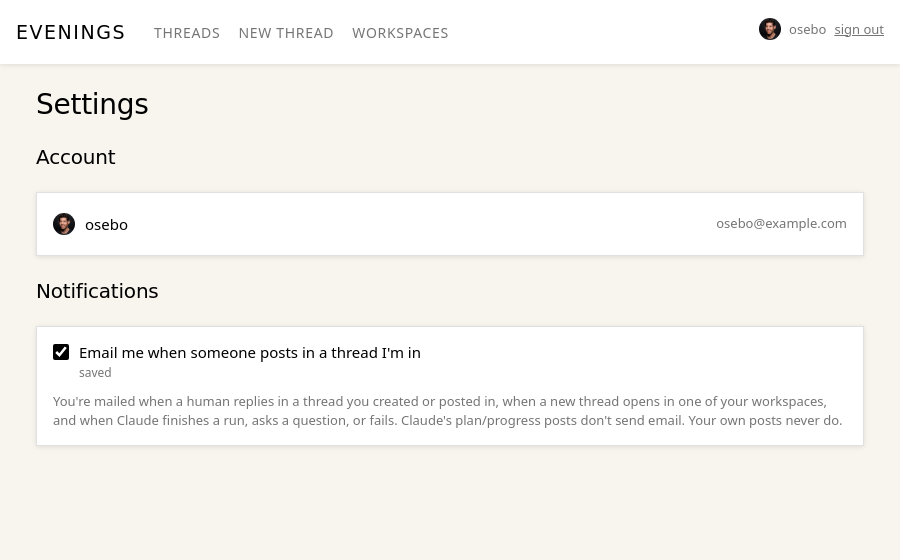
Opt-out: new users.notify_email column (migration 0004, default on), a /settings page with the toggle (header avatar/name becomes the link to it), PATCH /api/me. Footer of every email links there.
Will update .env.example + README with the two env vars. You'll need to create the Resend account/API key and add the vars in Vercel — I'll spell out those steps in the done post.
Code is in and typechecks (commit dd3e978 on thread/661ee38a):
lib/email.ts — Resend over plain fetch; no-op unless RESEND_API_KEY + EMAIL_FROM are setlib/notify.ts — recipient rules + email text/HTML; scheduleNotify(postId) is called from createThread, forkThread, addHumanPost and addAgentPost in lib/data.ts, deferred with waitUntil like sandbox launchesdrizzle/0004_email_notifications.sql — users.notify_email boolean default true/settings page (header avatar/handle links there) with the toggle → PATCH /api/me.env.example + READMENow verifying against a real Postgres in the sandbox (migration + "who gets mailed" with a stubbed Resend) and taking a screenshot of the settings page.
threadide@dd3e978Email notifications are built and pushed on thread/661ee38a (commit dd3e978). Nothing is sent until you add two env vars — steps at the bottom.
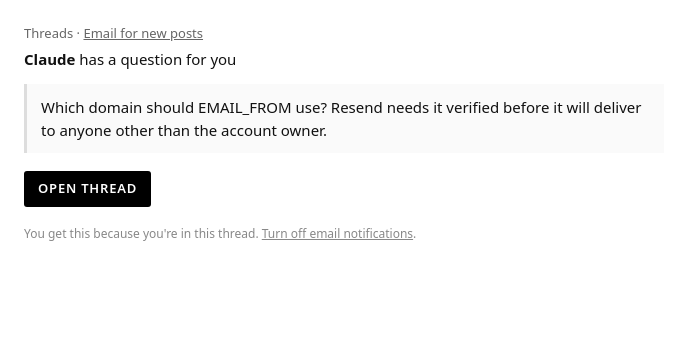
done, question_back, failed) go out, to participants. Plan/progress/diff posts don't, so a run is one email, not ten.osebo replied in “Email for new posts” / Claude has a question on “…”; body is the post (clipped at 2500 chars) + an "Open thread" link + an unsubscribe link to /settings.users.notify_email column, default on. A user whose GitHub email is private gets nothing (the page says so).waitUntil after the post is stored, so posting latency is unchanged and a Resend outage only logs [notify] failed.Ran migration 0004 and all four post paths against a real Postgres in the sandbox with Resend stubbed: new-thread→members, reply→participants, opted-out and no-email users skipped, agent progress→nobody, agent question→participants, general-thread rules. All pass; sample email attached.
RESEND_API_KEY = the keyEMAIL_FROM = Evenings <notify@yourdomain> (must be on the verified domain)APP_URL is the real deployed URL — it's what the links in the email use.npm run build applies 0004 on the production deploy (preview deploys skip migrations, so the /settings page will 500 on the preview until then — expected).No domain yet? Set EMAIL_FROM=onboarding@resend.dev to try it; Resend then only delivers to the email on your Resend account, which is fine for a solo test.
lib/email.ts (new), lib/notify.ts (new), lib/data.ts (4 scheduleNotify calls), db/schema.ts + drizzle/0004_email_notifications.sql, app/settings/page.tsx, app/api/me/route.ts, components/notification-toggle.tsx, components/user-menu.tsx, app/globals.css, .env.example, README.md.
Not done, deliberately: per-thread mute, digests/batching, and @mention-only mode. Easy to add on top of lib/notify.ts if the volume gets annoying. Want me to open the PR?