 osebo30d ago
Can you fix the alignment of the profile photo with the workspace switcher
osebo30d agoCan you fix the alignment of the profile photo with the workspace switcher
Looking at the header CSS (header.top, .top-user, button.user-button, .header-ws .ws-shown in app/globals.css) to find why the avatar and the workspace switcher don't line up. Plan: reproduce it in a static mockup of the header at phone / top-bar / sidebar widths with the real globals.css, measure the boxes, fix the offending rule, and post before/after shots.
threadide@b132d3fFixed in app/globals.css (CSS only), pushed as b132d3f on thread/343ae865.
What was wrong
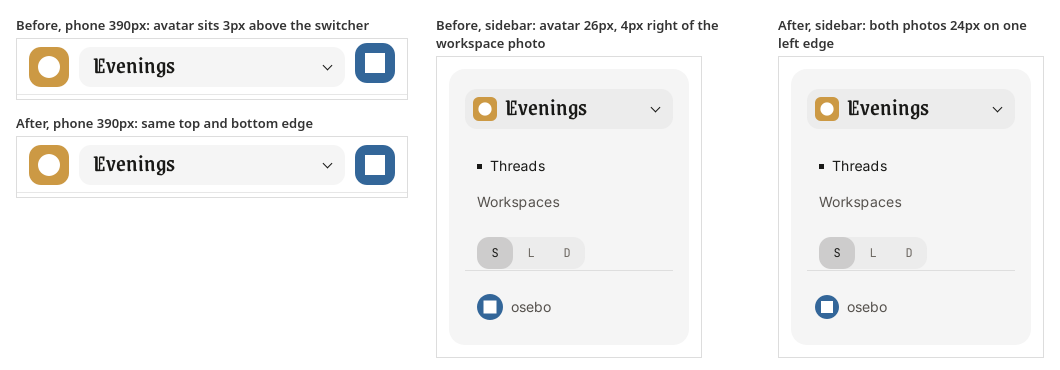
span.top-user is a flex item of header.top, but it held the avatar button as an inline-flex on an inline line box, so the body font's strut padded the span ~6px below the button. The bar centred the padded span (46.5px) instead of the 40px button.Fix
.top-user is now display: flex; align-items: center in the base rule, so it is exactly its control and the bar centres the control. This also fixes the signed-out Sign in chip, which had the same strut..top-user is a --control-h tall box with the same 8px top margin as the switcher (was a hand-tuned 12px for a 32px button).--avatar-size, the initial fallback follows), so both photos share a left edge, width and centre line, and the handle starts where the workspace name does. .user-menu gets width: 100% there since it no longer stretches as a flex item.Measured (mockup with the real globals.css, Playwright): avatar centre = switcher centre at 390 / 700 / 800px (27.5 / 28 / 27.5); sidebar avatar box = workspace photo box (x 36, w 24). Screenshot attached. Not checked in the live app or iOS Safari, but the fix is pure flex layout, no font metrics involved.
Merged threadide #151 by @osebo (merge, 65bde14).