 osebo31d ago
I want to be able to set the theme for each workspace, not just globally and it should persist
osebo31d agoI want to be able to set the theme for each workspace, not just globally and it should persist
Today the theme (System | Light | Dark plus the palette picked on /themes) lives only in this browser's localStorage, so it is the same for every workspace and disappears with the browser. Plan:
Model: a workspace gets its own palette, stored on the server.
workspaces.theme jsonb (drizzle/0012): { dark: <palette id> | null, light: <palette id> | null }, same two slots the gallery already has. Only palette ids are stored; the CSS is derived at render time so a palette mapping change applies everywhere.PATCH /api/workspaces/[id] { theme }. Members and visitors see it: a forum gets a look of its own, like the name and the address.Where it applies: every page that is about a workspace (/<slug>, /threads/[id], /workspaces/[id]) renders a small WorkspaceTheme component: an inline script applies the palette before the page paints (like THEME_INIT_SCRIPT in the head), and an effect keeps it in sync on soft navigation and restores the browser palette when you leave the workspace. /themes, /workspaces, /about keep the browser palette.
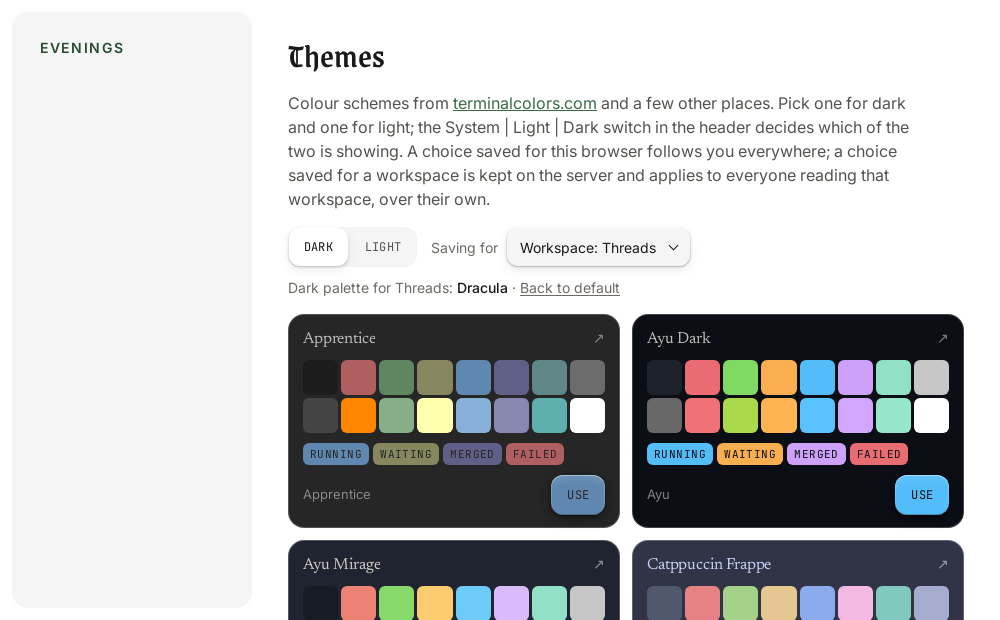
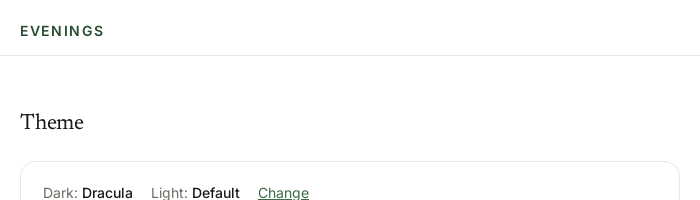
Picking it: /themes gets a "Saving for" control: This browser (today's behaviour) or any workspace you own (preselected to the header's current workspace). With a workspace selected, "Use" / "Back to default" write to the server and the page previews that workspace's palette live. The manage page (/workspaces/[id]) shows the current palettes with a link to /themes for that workspace.
If you'd rather have a personal per-workspace theme (my own choice for each workspace, not shared with members), say so: that would be a per-user table instead of a workspace column, and the rest of the plumbing stays the same.
threadide@f469307Done and pushed on thread/dc46c8c6 (threadide f469307).
What you get
workspaces.theme, migration drizzle/0012). It applies to everyone reading that workspace, over whatever they picked for their own browser. Your System | Light | Dark switch still decides which of the two is showing.?workspace=<id>), so picking a tile there saves to that workspace; with a workspace selected the page shows that workspace's palettes so you see exactly what its readers get./<slug>, /threads/[id], /workspaces/[id]. The palette is set before first paint on a hard load (inline script, same trick as the head script) and swapped in/out on soft navigation, so going from a themed workspace to /about or /workspaces gives you your browser palette back.Choices to be aware of
Verified: tsc and next build pass; the inline script was run in a Node vm for forced dark / forced light with no light slot / system+OS dark; screenshots attached are the real components rendered against globals.css (the app can't run here, so the PATCH round trip and the before-paint behaviour on a live page are not exercised). Deploy needs nothing beyond the normal production build, which applies the migration.
Merged threadide #141 by @osebo (merge, 51251ac).